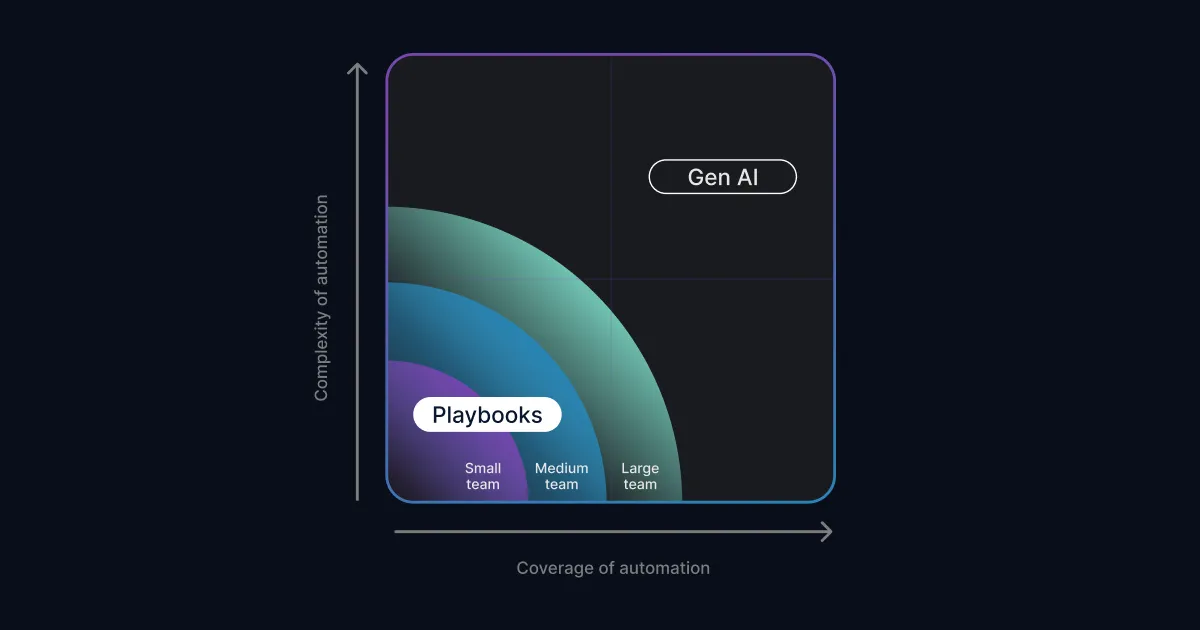

A SOAR playbook is a predefined workflow that a security orchestration, automation, and response (SOAR) platform runs when an alert matches a trigger condition. Each playbook chains if-then steps the team has written in advance: gather context on the alert, apply decision logic, and carry out approved actions like opening a ticket, paging the on-call analyst, or quarantining a confirmed-bad email.
Playbooks are still the backbone of response automation in most SOCs. They are also the part of SOAR that consumes the most engineering time, and they stop short on alerts that need investigation rather than a scripted reaction. That gap is driving the evolution from SOAR to the agentic SOC model. This guide covers how playbooks work, three common examples, where they excel, where they hit their limits, and what changes when AI agents investigate alerts instead of executing fixed branches.
How SOAR Playbooks Work
Every SOAR playbook, whatever the platform, is built from the same three parts:
• A trigger. The condition that starts the run. Usually a new alert from the SIEM, EDR, email gateway, or identity provider that matches defined criteria.
• Decision logic. If-then branches that test what the playbook found at each step. Is the file hash known bad? Is the sender domain younger than 30 days? Did the user confirm the login?
• Actions. The steps the platform carries out, like querying threat intelligence, detonating an attachment in a sandbox, opening a ticket, or notifying the on-call analyst. Response actions, such as disabling an account, typically sit behind an approval gate the team defines.
The playbook runs the same way every time. That determinism is the point. Runs are fast, repeatable, and easy to audit. It is also the constraint everything else in this post comes back to, because a playbook can only handle what its author predicted.
SOAR Playbook Examples
Three patterns show up in almost every SOC's playbook library. Each follows the trigger, logic, actions shape from above, and each one hands its hard cases to a human.
Phishing triage. Trigger: a user-reported email or an email gateway alert. The playbook parses headers, URLs, and attachments, checks each indicator against threat intelligence, detonates attachments in a sandbox, and scores the message. A confirmed phish gets quarantined across mailboxes under policy, the reporter gets a confirmation note, and a ticket records the run. The playbook stalls when the verdict is ambiguous, like a clean-scanning email from a lookalike domain registered last week.
Malware alert enrichment. Trigger: an EDR detection. The playbook pulls the file hash, queries reputation services, submits the sample to a sandbox, and attaches asset context such as machine owner and exposure. Policy decides the routing. A known-bad hash on a critical server can page the on-call analyst directly, with host isolation held behind a human approval step. A novel binary with no reputation history lands in the queue for manual analysis.
Impossible travel. Trigger: an identity alert for sign-ins from two distant locations in a short window. The playbook compares both sign-ins against corporate VPN ranges and known egress points, checks MFA results and device compliance, and messages the user to confirm the activity. No confirmation means escalation to an analyst. VPNs and mobile carriers make geolocation noisy, so this playbook tends to produce some of the highest false-positive volume in the library.
Notice the shape all three share. The playbook handles the predictable middle of its alert type and hands the ambiguous edges to a person. That handoff is where the next two sections pick up.
Where SOAR Playbooks Excel
Playbooks earn their keep wherever the right response is already written down in policy. They automate routine tasks and embed the knowledge of experienced staff into workflows, which multiplies what a small team can cover.
They are strongest at three jobs:
• Policy-based responses. If policy says only service accounts may access certain S3 buckets, a playbook that suspends a violating IAM user until someone reviews the access is a clean fit. The decision is binary and the action is reversible.
• Enrichment and routing. Checking indicators against threat intelligence, attaching asset and identity context, setting severity, and paging the right person. This is the highest-volume, lowest-risk playbook work.
• Consistency and audit evidence. A playbook runs identically at 3 a.m. and 3 p.m., and every step is logged. For compliance reviews, that paper trail is hard to beat.
Where SOAR Playbooks Hit Their Limits
Anyone who has built playbooks knows the catch. Complexity gets out of control quickly, even with a drag-and-drop builder. The community playbook below automates one of the simplest tasks in security operations, submitting a suspicious file to a sandbox for malware analysis, and it still sprawls:
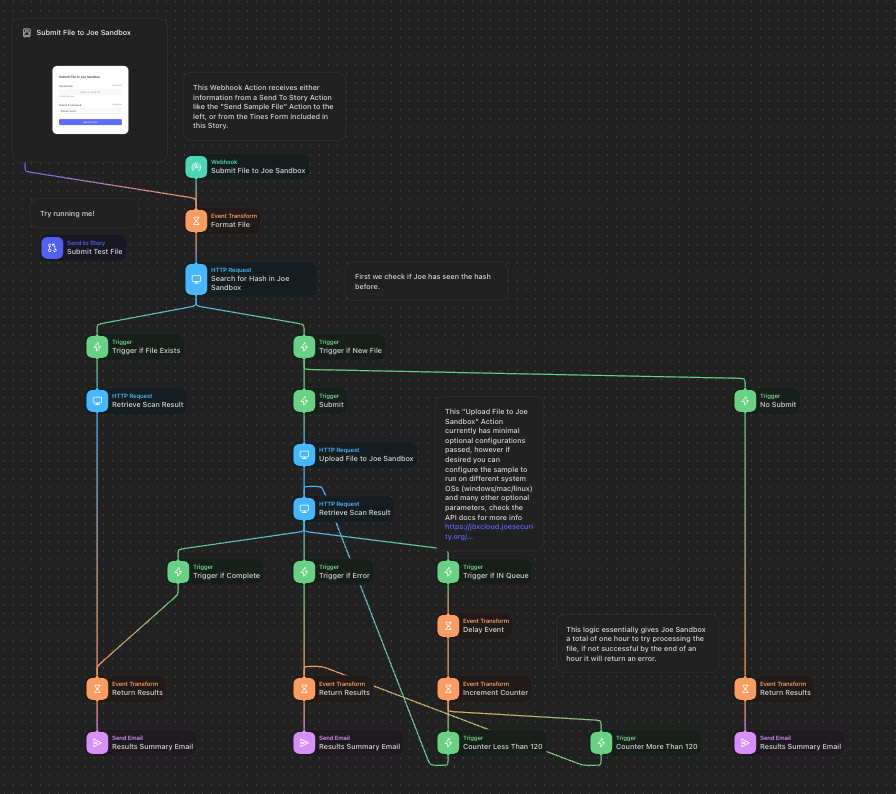
Four limits show up in practice:
• Branches multiply faster than authors can write them. Every variable an alert can present needs its own path. Three or four interacting variables produce more branches than a team can realistically chart, so authors trim to the common cases.
• Novel and context-heavy alerts have no branch at all. A playbook handles what its author predicted. An alert whose verdict depends on context, like whether a login pattern is normal for this user in this role, does not resolve through fixed logic.
• Maintenance is a standing tax. Integrations change, APIs deprecate, and detection logic evolves. Some large security operations teams staff dedicated automation engineers whose job is predicting which workflows to automate and keeping the library alive.
• The long tail never gets covered. Each playbook costs engineering time, so alert types that fire a few times a month rarely justify one. Those are exactly the alerts that consume disproportionate analyst time.
None of this is an argument against playbooks. It is the boundary line of if-then automation, and it is where a different mechanism takes over.
AI Agents Handle Complex and Long-Tail Investigations
Where the playbook's last branch ends, autonomous alert investigation takes over. AI agents are built for open-ended investigative problems, including the long tail of alerts that fire too rarely to justify a playbook.
The mechanical difference is the logic. A playbook executes branches written in advance. An AI agent forms a hypothesis about the alert, runs lookups across the connected environment, and reasons over the results in successive passes until the evidence supports a conclusion. Dropzone AI calls this Recursive Reasoning, and it is the investigation method behind the AI SOC Analyst.
Take a typical firewall alert. An enrichment playbook checks the alert against threat intelligence, which has well-documented blind spots of its own, and hands the rest of the analysis to a human. The community playbook below, which enriches WAF alerts with reputation data, stops exactly there:
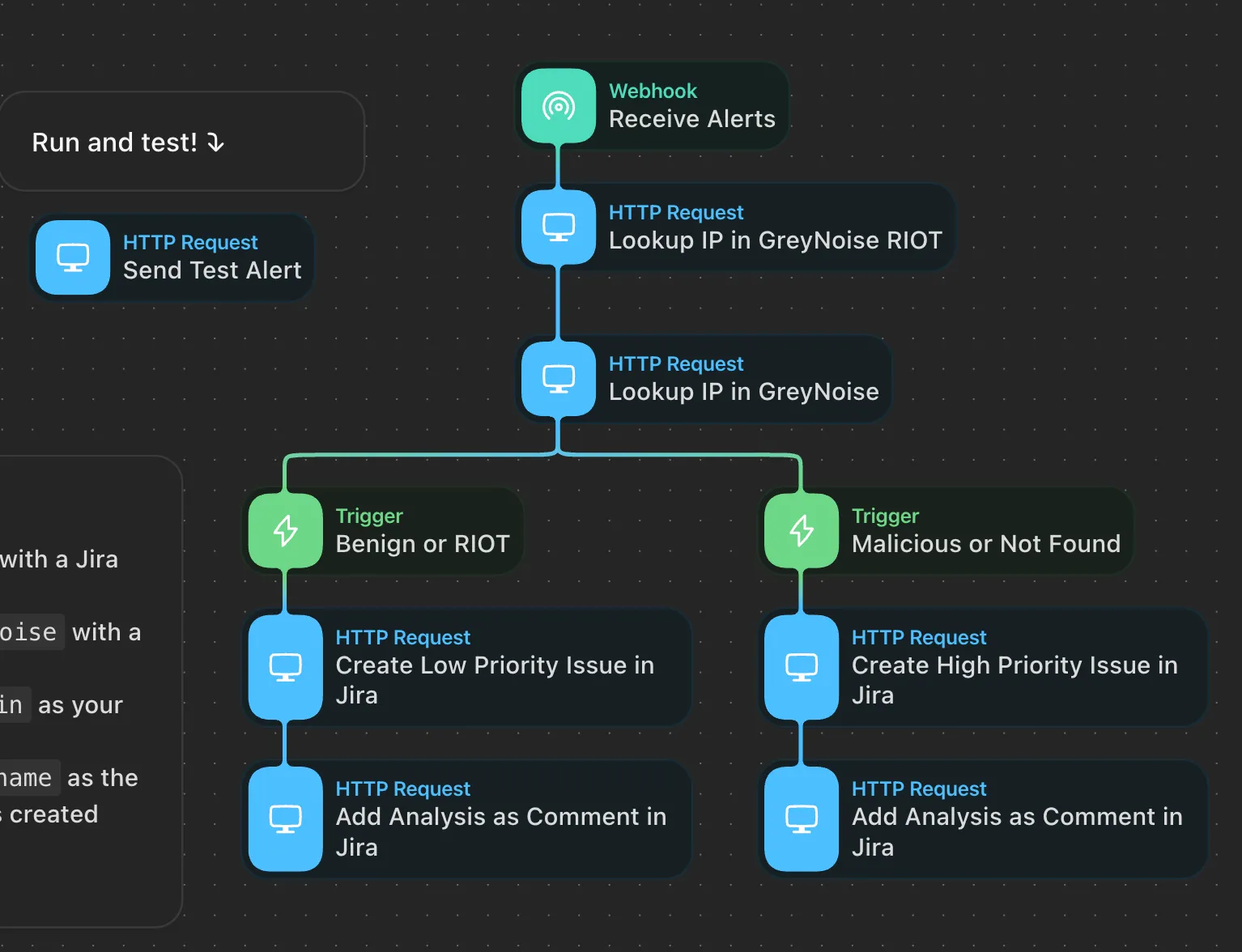
An AI agent keeps going. In the product demo below, the agent reaches a high-confidence conclusion on a Log4j exploit alert through several recursive reasoning steps:
- Understanding the initial alerts from a Palo Alto Networks firewall
- Inspecting a PCAP delivered by the firewall to discover the JNDI string used in a Log4j exploit
- Retrieving firewall traffic logs to confirm the target machine connected to the malicious IP used in the exploit
- Formulating a Splunk query to pull osquery telemetry from the target machine, confirming that it is running a vulnerable version of the Log4j software library
- Querying osquery telemetry in Splunk again to find Python3 processes using a reverse shell to communicate with the malicious IP
- Composing a summary report for the human analyst that walks through the above, with links to the raw data that serves as evidence
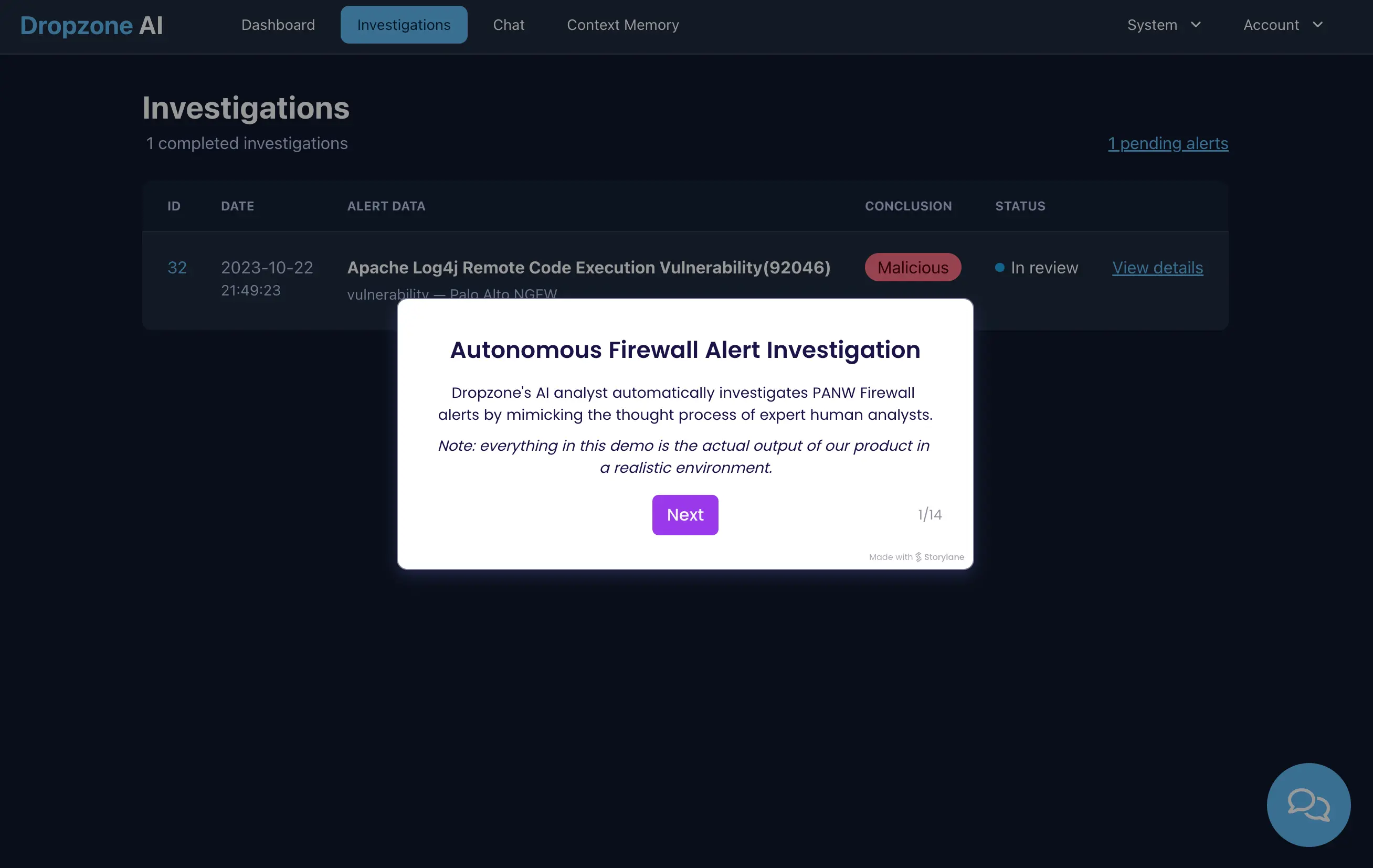
Each of those steps requires weighing evidence, deciding what to check next, and writing the right query in the right system. Fixed branches cannot run that sequence. An agent that reasons can, and because the AI SOC Analyst connects across 90+ integrations, the next lookup can happen wherever the evidence lives.
The boundary matters as much as the capability. The agent investigates and escalates. It delivers a verdict backed by evidence and hands confirmed threats to your analysts for response. It does not isolate hosts, block indicators, or close alerts on its own. Response stays with your team and the policy automations you already trust.
The results show up at alert-volume scale. Dropzone AI deployments average a 95% reduction in manual alert investigation work, and in Zapier's environment the measured result was an 85% reduction (Zapier case study).
For the category-level version of this matchup, see the full SOAR vs AI SOC analysts comparison.
Do Playbooks Still Have a Place in an AI-Driven SOC?
Yes, and not as a transitional compromise. Playbooks and AI agents solve different problems, so the practical question is how to divide the work, not which one wins.
The division that holds up in practice:
• AI agents take investigation. Alerts route to the agent for autonomous investigation. Under the agentic SOC model, AI agents investigate every alert end to end, and analysts receive a verdict with the evidence attached instead of a raw queue.
• Playbooks keep policy-based response and routing. Quarantine actions, account suspensions, paging, and ticket hygiene stay in the deterministic, auditable workflows your team already trusts. The agent's escalation simply becomes one more well-defined trigger for them.
• Humans keep judgment and response decisions. Escalation paths, approval gates, and response choices stay with your analysts. The agent's job ends at a concluded, evidence-backed position.
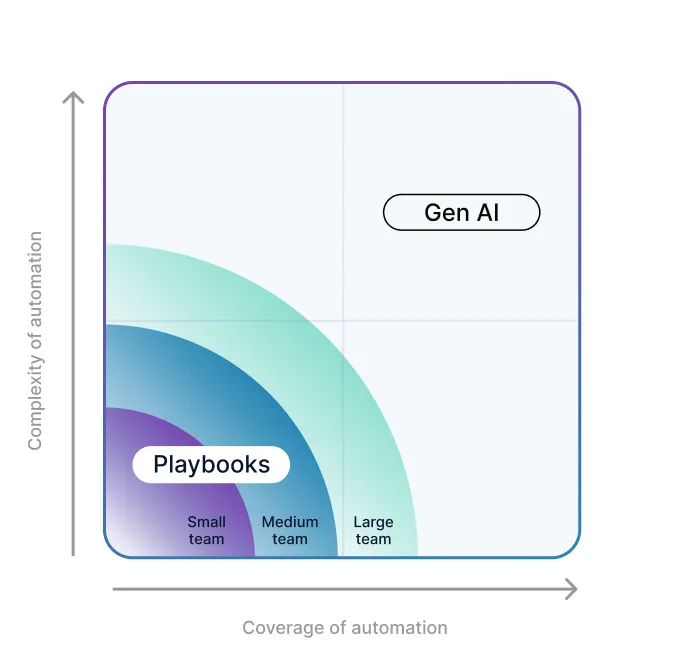
• Larger SOC teams with dedicated automation engineers can support deeper playbook libraries. Smaller teams see value from agents sooner, because agents do not need a branch library built first.
• Playbooks remain best for policy-based responses, like paging the on-call immediately when a data exfiltration alert flags one of your six production S3 buckets.
• When an alert turns on more than about three interacting variables, agent investigation tends to produce better outcomes than branch-building, and it saves the development time entirely.
The same pattern holds at service-provider scale, where playbook libraries multiply across client environments. ECS, a top-5 MSSP in North America, sends 30K alerts a month through Dropzone for investigation while its own response workflows stay in place. We cover that side in scaling MSSP alert investigations with automation. And if you are mapping where an agent plugs into the SOAR, SIEM, and XDR stack you already run, see how AI SOC analysts integrate with SOAR automation.
Saved Time Means More Cybersecurity
The premise of security orchestration, automation, and response is saving time, but playbooks demand a standing investment of it. Cut the hours your team spends building and maintaining branches, and the question becomes what to do with the time you get back. It is like asking what firefighters would do if they did not have to fight fires. They would do a lot. They could work on prevention and education.
When AI agents pick up alert investigation, the recovered analyst time goes to the work that compounds:
- Detection engineering, writing customized alerts the AI agents can investigate autonomously
- Tabletop exercises that prepare the organization for security incidents, including the operational pieces that get neglected, like legal ramifications and public communications
- Preventative hardening, like finding storage buckets holding sensitive data, enforcing least-privilege IAM policies, and shrinking the public-facing attack surface
- Improving visibility by tuning logging and operationalizing the security tools already on the shelf
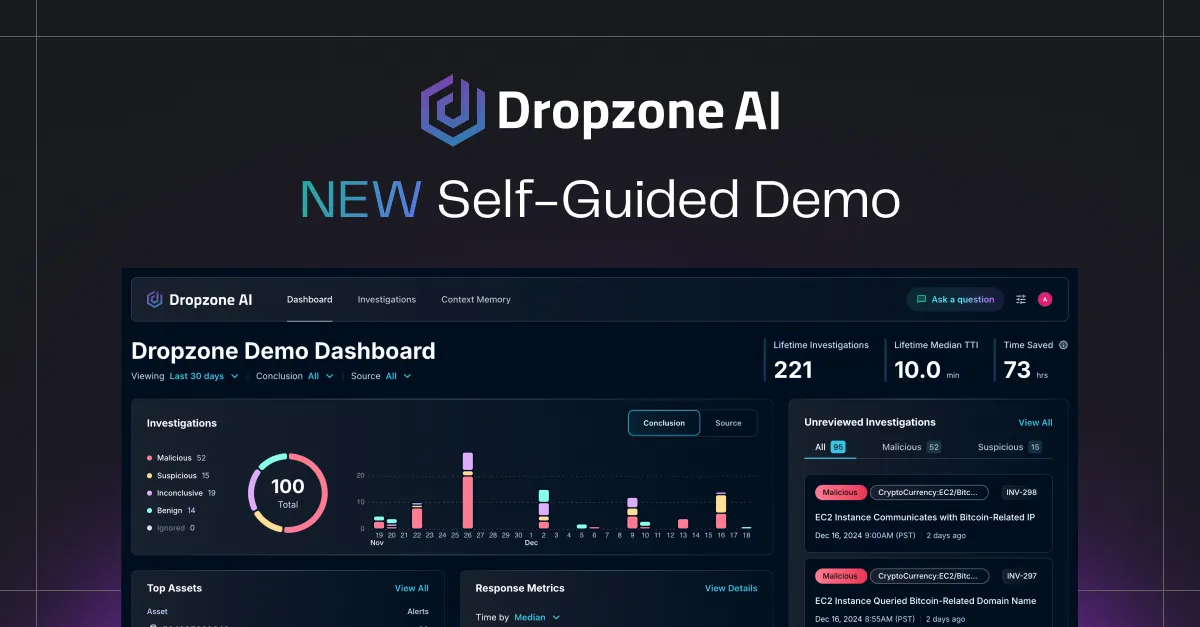
That work takes the judgment of your human analysts, and it is exactly what they cannot get to while they are buried in triage. The AI SOC Analyst investigates every alert and hands your team a verdict with the evidence attached. If you are weighing the product side directly, the Dropzone AI vs SOAR comparison covers it. Walk through a real investigation in the self-guided demo, or request a demo to see it on your own alerts.










.png)