"/><stop offset="1" stop-color="rgb(96, 110, 234)"/></linearGradient><linearGradient id="W2X9EKAmH-2169866396-linear-gradient" x1="0.49751243781094523" x2="0.5024875621890548" y1="0" y2="1"><stop offset="0" stop-color="rgb(120, 70, 175)"/><stop offset="1" stop-color="rgb(96, 110, 234)"/></linearGradient></defs><g fill="transparent" height="6.667790173290786px" id="WxDMP_wo5" transform="translate(0 -0.335)" width="40.000237191183544px"><path d="M 0 6.667 L 0 0 L 40 0 L 40 6.667 Z" fill="transparent" height="6.666666666666666px" id="sESj6aK3L" width="40px"/><path d="M 5.133 1.25 L 5.133 4.583 L 2.933 5.833 L 0.733 4.583 L 0.733 2.083 L 2.933 0.833 L 2.933 0 L 0 1.667 L 0 5 L 2.933 6.667 L 5.867 5 L 5.867 1.667 Z" fill="url(%23SjiByaea2-2169866396-linear-gradient)" height="6.666666666666666px" id="SjiByaea2" width="5.866783625730994px"/><path d="M 0.733 3.333 L 0.733 2.5 L 1.467 2.083 L 1.467 1.25 L 0 2.083 L 0 3.75 L 1.467 4.583 L 2.933 3.75 L 2.933 0.417 L 2.2 0 L 2.2 3.333 L 1.467 3.75 Z" fill="url(%23W2X9EKAmH-2169866396-linear-gradient)" height="4.583333333333334px" id="W2X9EKAmH" transform="translate(1.467 0.417)" width="2.9334035087719315px"/><path d="M 0 3.985 L 0 0 L 1.547 0 C 1.864 0 2.128 0.045 2.342 0.134 C 2.559 0.22 2.733 0.346 2.864 0.513 C 2.994 0.681 3.087 0.883 3.142 1.12 C 3.201 1.357 3.231 1.628 3.231 1.931 C 3.231 2.239 3.203 2.517 3.148 2.766 C 3.097 3.014 3.008 3.23 2.881 3.413 C 2.755 3.596 2.585 3.738 2.371 3.839 C 2.158 3.936 1.891 3.985 1.571 3.985 Z M 0.818 3.308 L 1.524 3.308 C 1.709 3.308 1.86 3.273 1.974 3.203 C 2.089 3.133 2.176 3.036 2.235 2.911 C 2.298 2.783 2.34 2.637 2.36 2.474 C 2.383 2.307 2.395 2.126 2.395 1.931 C 2.395 1.745 2.383 1.575 2.36 1.424 C 2.336 1.268 2.292 1.136 2.229 1.027 C 2.17 0.914 2.083 0.829 1.968 0.77 C 1.858 0.708 1.709 0.677 1.524 0.677 L 0.818 0.677 Z" fill="rgb(255, 255, 255)" height="3.984970760233911px" id="pQ_u90pAO" transform="translate(8.945 1.452)" width="3.231064327485413px"/><path d="M 0 2.999 L 0 0.07 L 0.789 0.07 L 0.789 0.414 C 0.856 0.364 0.939 0.311 1.038 0.257 C 1.136 0.198 1.243 0.146 1.358 0.099 C 1.476 0.049 1.589 0.016 1.696 0 L 1.696 0.753 C 1.593 0.768 1.484 0.795 1.37 0.834 C 1.255 0.869 1.146 0.908 1.044 0.951 C 0.945 0.994 0.86 1.033 0.789 1.068 L 0.789 2.999 Z" fill="rgb(255, 255, 255)" height="2.9989356725146212px" id="HUQJBJ1t7" transform="translate(12.803 2.437)" width="1.6956725146198863px"/><path d="M 1.387 3.057 C 1.051 3.057 0.781 3.003 0.575 2.894 C 0.373 2.785 0.227 2.618 0.136 2.392 C 0.045 2.163 0 1.867 0 1.505 C 0 1.155 0.047 0.871 0.142 0.653 C 0.237 0.432 0.387 0.268 0.593 0.163 C 0.798 0.054 1.063 0 1.387 0 C 1.715 0 1.98 0.054 2.182 0.163 C 2.387 0.268 2.537 0.432 2.632 0.653 C 2.731 0.871 2.78 1.155 2.78 1.505 C 2.78 1.867 2.735 2.163 2.644 2.392 C 2.553 2.618 2.405 2.785 2.2 2.894 C 1.998 3.003 1.727 3.057 1.387 3.057 Z M 1.387 2.415 C 1.553 2.415 1.678 2.386 1.761 2.328 C 1.844 2.266 1.899 2.168 1.927 2.036 C 1.958 1.9 1.974 1.723 1.974 1.505 C 1.974 1.291 1.956 1.122 1.921 0.998 C 1.885 0.869 1.826 0.778 1.743 0.723 C 1.66 0.669 1.541 0.642 1.387 0.642 C 1.237 0.642 1.118 0.669 1.032 0.723 C 0.949 0.778 0.889 0.869 0.854 0.998 C 0.818 1.122 0.8 1.291 0.8 1.505 C 0.8 1.723 0.814 1.9 0.842 2.036 C 0.873 2.168 0.931 2.266 1.014 2.328 C 1.097 2.386 1.221 2.415 1.387 2.415 Z" fill="rgb(255, 255, 255)" height="3.057263157894756px" id="EIrO2_THA" transform="translate(14.828 2.444)" width="2.7804678362573156px"/><path d="M 0 4.224 L 0 0.064 L 0.782 0.064 L 0.788 0.251 C 0.844 0.216 0.913 0.179 0.996 0.14 C 1.083 0.101 1.176 0.068 1.275 0.041 C 1.373 0.014 1.47 0 1.565 0 C 1.964 0 2.251 0.126 2.425 0.379 C 2.599 0.628 2.686 1.007 2.686 1.517 C 2.686 1.883 2.642 2.178 2.555 2.404 C 2.468 2.629 2.328 2.795 2.134 2.9 C 1.945 3.005 1.694 3.057 1.381 3.057 C 1.282 3.057 1.176 3.049 1.061 3.034 C 0.947 3.018 0.856 3.003 0.788 2.987 L 0.788 4.224 Z M 1.257 2.41 C 1.415 2.41 1.539 2.377 1.63 2.31 C 1.721 2.244 1.784 2.145 1.82 2.013 C 1.86 1.877 1.879 1.706 1.879 1.499 C 1.879 1.181 1.834 0.961 1.743 0.84 C 1.656 0.716 1.529 0.653 1.364 0.653 C 1.3 0.653 1.233 0.661 1.162 0.677 C 1.091 0.692 1.022 0.712 0.954 0.735 C 0.887 0.758 0.832 0.782 0.788 0.805 L 0.788 2.369 C 0.836 2.373 0.903 2.38 0.99 2.392 C 1.081 2.404 1.17 2.41 1.257 2.41 Z" fill="rgb(255, 255, 255)" height="4.2241871345029445px" id="azBGUfGeg" transform="translate(18.207 2.444)" width="2.6856140350876103px"/><path d="M 0 2.929 L 0 2.27 L 1.346 0.688 L 0 0.688 L 0 0 L 2.384 0 L 2.384 0.636 L 1.026 2.24 L 2.389 2.24 L 2.389 2.929 Z" fill="rgb(255, 255, 255)" height="2.9289239766081856px" id="GMxU4HuKZ" transform="translate(21.361 2.507)" width="2.3893567251462002px"/><path d="M 1.387 3.057 C 1.051 3.057 0.781 3.003 0.575 2.894 C 0.374 2.785 0.227 2.618 0.136 2.392 C 0.045 2.163 0 1.867 0 1.505 C 0 1.155 0.047 0.871 0.142 0.653 C 0.237 0.432 0.387 0.268 0.593 0.163 C 0.798 0.054 1.063 0 1.387 0 C 1.715 0 1.98 0.054 2.182 0.163 C 2.387 0.268 2.537 0.432 2.632 0.653 C 2.731 0.871 2.78 1.155 2.78 1.505 C 2.78 1.867 2.735 2.163 2.644 2.392 C 2.553 2.618 2.405 2.785 2.2 2.894 C 1.998 3.003 1.727 3.057 1.387 3.057 Z M 1.387 2.415 C 1.553 2.415 1.678 2.386 1.761 2.328 C 1.844 2.266 1.899 2.168 1.927 2.036 C 1.958 1.9 1.974 1.723 1.974 1.505 C 1.974 1.291 1.956 1.122 1.921 0.998 C 1.885 0.869 1.826 0.778 1.743 0.723 C 1.66 0.669 1.541 0.642 1.387 0.642 C 1.237 0.642 1.118 0.669 1.031 0.723 C 0.949 0.778 0.889 0.869 0.854 0.998 C 0.818 1.122 0.8 1.291 0.8 1.505 C 0.8 1.723 0.814 1.9 0.842 2.036 C 0.874 2.168 0.931 2.266 1.014 2.328 C 1.097 2.386 1.221 2.415 1.387 2.415 Z" fill="rgb(255, 255, 255)" height="3.057263157894756px" id="hVOAJWBR_" transform="translate(24.216 2.444)" width="2.7804678362571735px"/><path d="M 0 2.993 L 0 0.064 L 0.789 0.064 L 0.789 0.251 C 0.852 0.212 0.929 0.175 1.02 0.14 C 1.111 0.101 1.205 0.068 1.304 0.041 C 1.407 0.014 1.506 0 1.601 0 C 1.877 0 2.091 0.049 2.241 0.146 C 2.395 0.239 2.504 0.395 2.567 0.613 C 2.63 0.827 2.662 1.114 2.662 1.476 L 2.662 2.993 L 1.867 2.993 L 1.867 1.517 C 1.867 1.315 1.855 1.153 1.832 1.033 C 1.808 0.908 1.763 0.819 1.695 0.764 C 1.628 0.71 1.529 0.683 1.399 0.683 C 1.328 0.683 1.253 0.69 1.174 0.706 C 1.099 0.718 1.026 0.735 0.954 0.758 C 0.887 0.782 0.832 0.805 0.789 0.828 L 0.789 2.993 Z" fill="rgb(255, 255, 255)" height="2.993099415204677px" id="k6aC5HsJY" transform="translate(27.596 2.444)" width="2.6617543859649118px"/><path d="M 1.316 3.057 C 0.988 3.057 0.727 3.003 0.533 2.894 C 0.344 2.785 0.207 2.62 0.124 2.398 C 0.042 2.176 0 1.898 0 1.564 C 0 1.202 0.051 0.906 0.154 0.677 C 0.261 0.447 0.415 0.278 0.616 0.169 C 0.818 0.056 1.067 0 1.363 0 C 1.802 0 2.132 0.109 2.353 0.327 C 2.579 0.545 2.691 0.889 2.691 1.359 L 2.656 1.791 L 0.794 1.791 C 0.798 2.009 0.844 2.172 0.931 2.281 C 1.018 2.39 1.168 2.445 1.381 2.445 C 1.504 2.445 1.638 2.443 1.784 2.439 C 1.931 2.431 2.075 2.423 2.217 2.415 C 2.363 2.408 2.488 2.4 2.591 2.392 L 2.609 2.935 C 2.51 2.95 2.385 2.968 2.235 2.987 C 2.085 3.007 1.929 3.022 1.767 3.034 C 1.609 3.049 1.458 3.057 1.316 3.057 Z M 0.794 1.295 L 1.903 1.295 C 1.903 1.031 1.86 0.846 1.773 0.741 C 1.69 0.636 1.553 0.583 1.363 0.583 C 1.178 0.583 1.035 0.638 0.937 0.747 C 0.842 0.856 0.794 1.039 0.794 1.295 Z" fill="rgb(255, 255, 255)" height="3.0572631578947593px" id="HWRgQ4Zqc" transform="translate(30.819 2.443)" width="2.691461988304269px"/><path d="M 0 3.985 L 1.031 0 L 2.46 0 L 3.486 3.985 L 2.668 3.985 L 2.442 3.18 L 1.026 3.18 L 0.812 3.985 Z M 1.156 2.532 L 2.324 2.532 L 1.867 0.653 L 1.619 0.653 Z" fill="rgb(255, 255, 255)" height="3.984970760233911px" id="FKU8sIkPM" transform="translate(35.19 1.452)" width="3.48608187134505px"/><path d="M 0 3.985 L 0 0 L 0.818 0 L 0.818 3.985 Z" fill="rgb(255, 255, 255)" height="3.984970760233918px" id="dMjn7rx8Q" transform="translate(39.182 1.452)" width="1px"/></g></svg>)

Key Takeaways
AI efficiency in SecOps should be defined by measurable impact.Don’t use AI for its own sake; real value is reducing alert fatigue, investigation time, and manual workload.
Success depends on tracking the right operational metrics.Key indicators like dwell time, MTTR, and analyst touchpoints help teams understand whether AI improves performance.
Clear baselines and focused use cases are critical for meaningful results.Teams should start with defined goals and apply AI to high-friction areas like triage or incident response to see tangible improvements.
Quick Answer
AI efficiency in SecOps means measurably reducing investigation time, alert fatigue, and manual workload through focused automation. Start by establishing baselines for key metrics like MTTR and dwell time, then deploy AI tools like Dropzone AI that can demonstrate 5x improvements in incident response speed while maintaining investigation quality.
Introduction
You are being handed AI budgets with little more than a broad directive to “make things more efficient.” That kind of mandate sounds promising, but wasting time or investing in the wrong areas is easy without a clear definition of success. The 2025 SANS SOC Survey found that while nearly 40% of survey respondents use AI/ML tools in the SOC, they aren’t part of defined workflows.
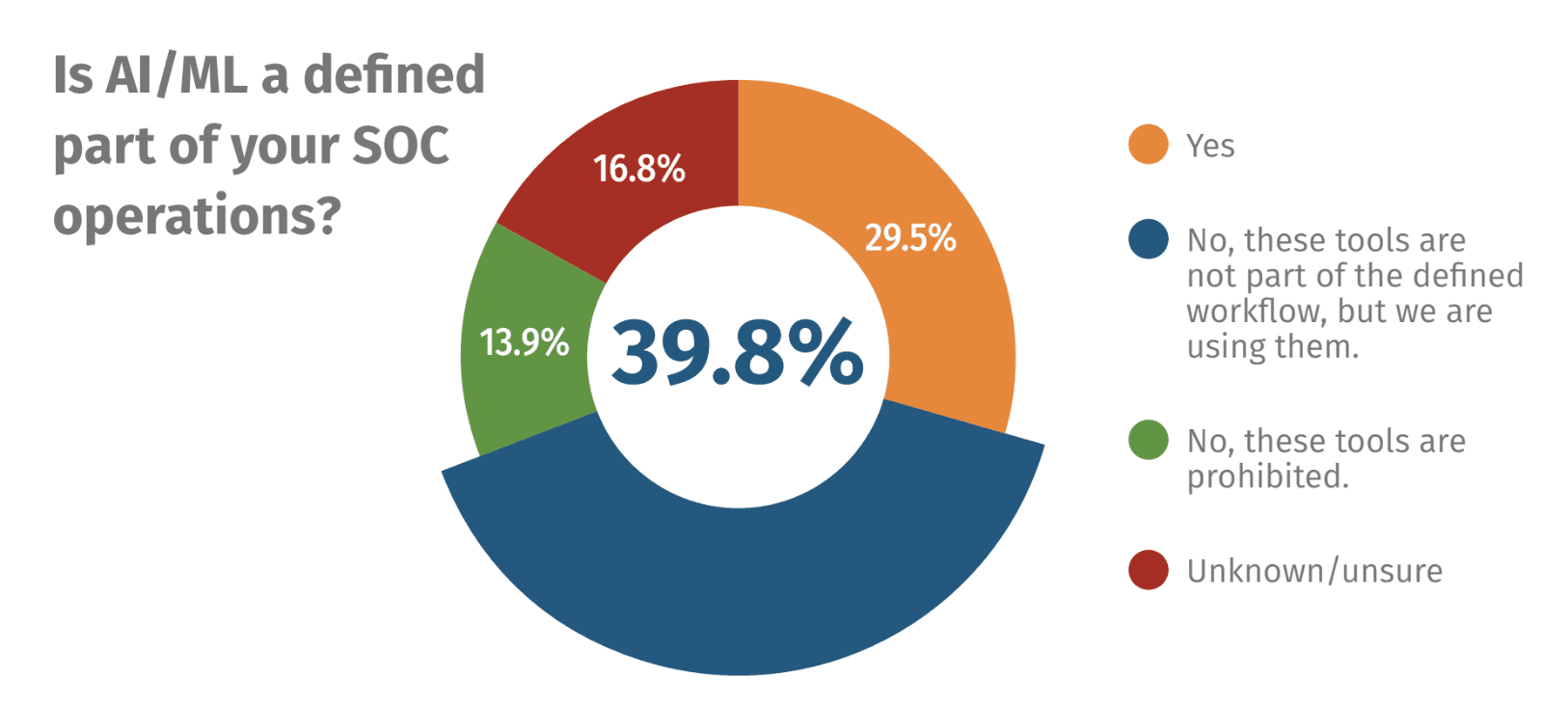
Source: 2025 SANS SOC Survey
Most teams aren’t struggling to adopt AI; they’re trying to figure out where it makes a difference. This article outlines how to approach that challenge with focus, clarity, and real-world examples.
What Does AI Efficiency in SecOps Mean?
When people talk about using AI in security operations, the conversation often jumps straight to language models or automation tools. But efficiency isn’t defined by which tool you use; it’s about what improves. If an AI system doesn’t help reduce the noise, cut down the investigation cycle, or make your team’s workload lighter, then it’s not delivering meaningful value.
Most teams are under pressure to do more with less. That might mean shortening dwell time, getting alerts in front of the right analyst faster, or scaling triage without burning out staff. Efficiency in this context means removing repetitive, manual steps and helping analysts focus on actual decision points. It’s the operational improvements, not just technical upgrades, that matter.
There’s a lot of confusion around what counts as “AI efficiency.” Automating for the sake of automation doesn’t help. Repackaged chatbots, broad language models that don’t tie into your context, or tools that generate more questions than answers often add overhead instead of reducing it.
Efficiency should be observable. You should be able to point to a specific part of your incident response or alert handling process and say, “This now takes half the time it used to.” Without that change, it’s just another tool in the stack that might end up as shelfware.
Use Cases for Dropzone AI’s AI-Driven Efficiency
In real-world purple team exercises for one client, Dropzone AI helped cut incident response times by a factor of five. These weren’t staged scenarios or demo environments but structured tests with measurable before-and-after performance data. The difference came from how the platform handled alert flow and reduced the time analysts spent collecting context manually.
One of the biggest improvements was in the detection-to-containment cycle. First off, Dropzone AI eliminated MTTA (mean time to acknowledge), which is the time an alert sits in a queue waiting to be investigated and typically the biggest component of MTTR. The Dropzone AI system automatically surfaced relevant context alongside alerts, allowing analysts to move straight into decision-making instead of jumping between tools. This created faster handoffs and shorter dwell times without sacrificing investigation depth.
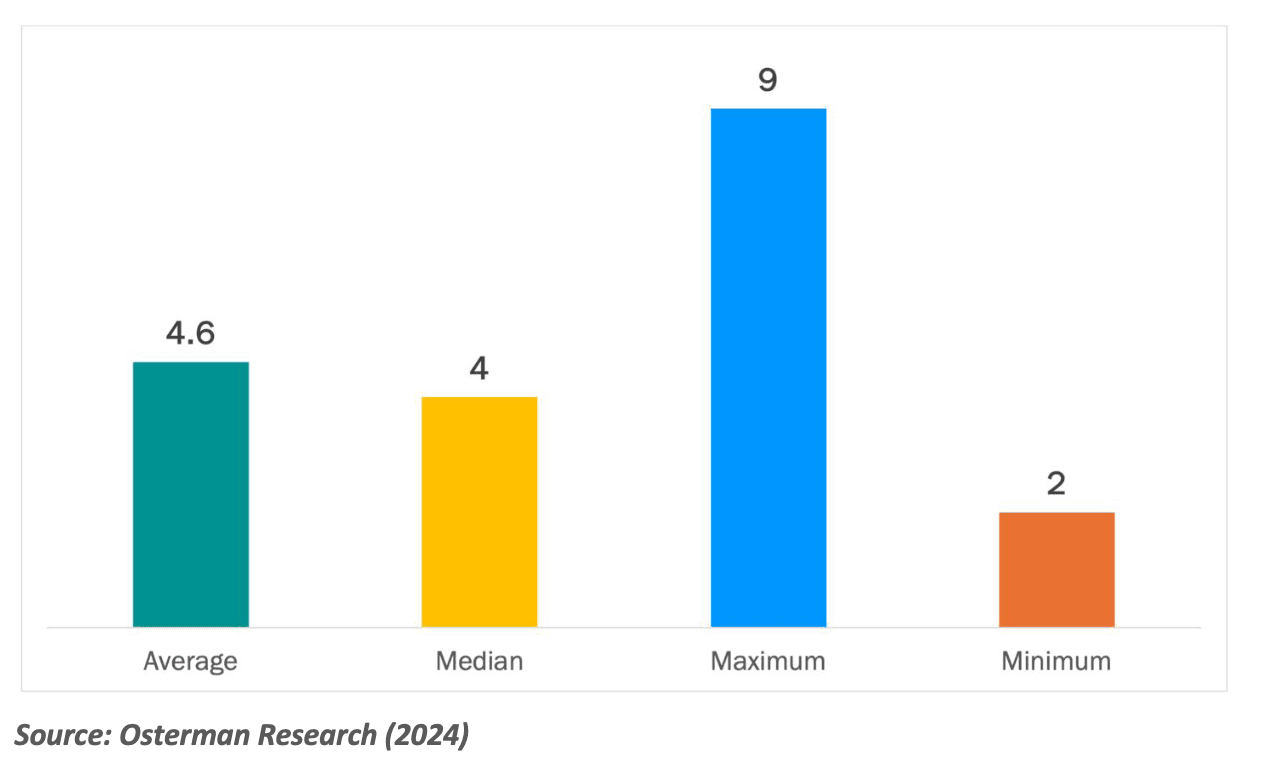
A 2024 Osterman Research survey found that, on average, 4.6 employees are involved in an incident. That’s a lot of context-switching and disruption for employees, not to mention friction added to the response process. AI SOC Agents like Dropzone AI can reduce the need for specialist skills and allow junior analysts to investigate further before escalating.
Triage also became more focused. Instead of presenting every alert equally, Dropzone AI prioritized based on context, like previous activity from the same host or known behavioral patterns, so analysts could spend their time where it mattered most. That led to fewer low-value distractions and better use of team resources.
Finally, the system handled repetitive tasks like log gathering and correlation. This reduced fatigue and let analysts focus on actual security judgments instead of rote work. For teams under pressure to improve response time and accuracy, these gains aligned directly with AI efficiency mandates already from leadership.
How to Measure and Prove AI Efficiency
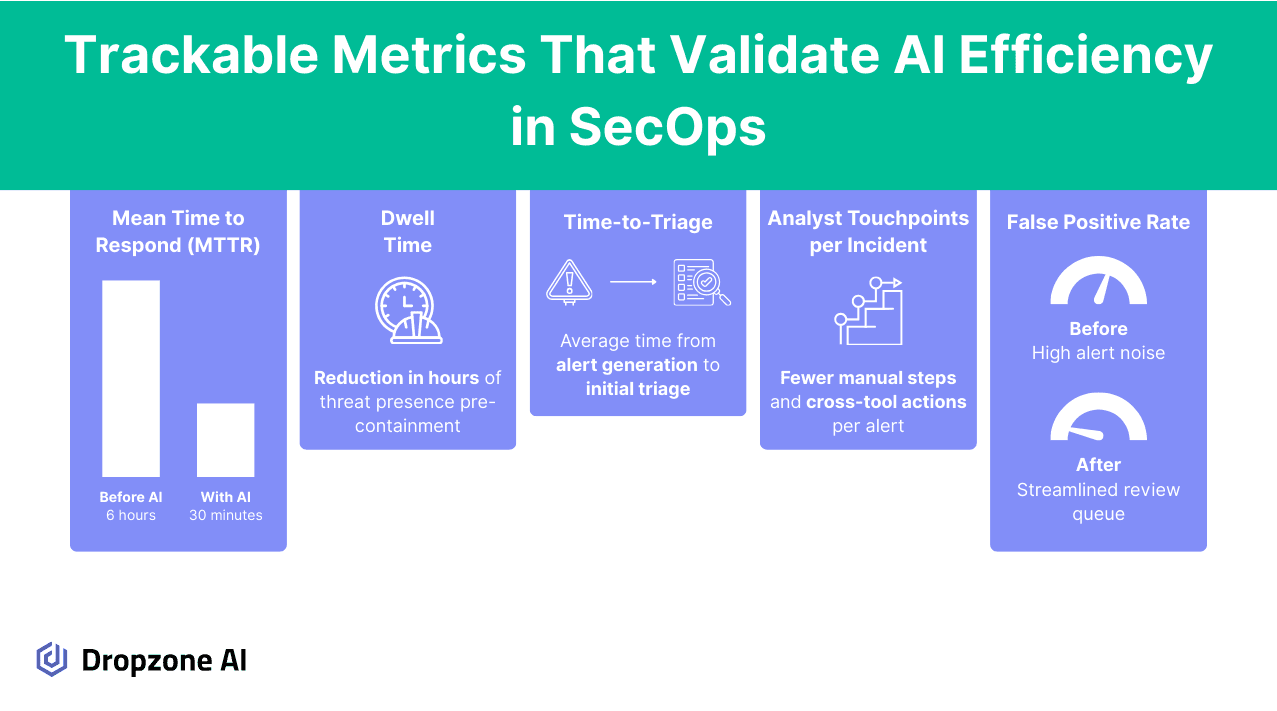
The first step is to define a baseline. It’s difficult to say whether anything has improved without a clear starting point. That means logging your current incident response time, how many alerts your team handles each week, and how much effort is going into each investigation. Even rough numbers can give you a solid reference to measure against later.
From there, focus on metrics that reflect actual operational improvement. Dwell time is a useful signal; it tells you how long threats stay active before they’re resolved. Time-to-triage helps you understand how quickly analysts can assess and route incoming alerts. Analyst touchpoints per incident can show whether manual effort decreases as automation increases.
These numbers should move in the right direction if your AI tools are doing what they claim. If alert investigations are faster and require fewer people to resolve, you can confidently take that to leadership. Measuring change over time, especially across multiple incidents, will help filter out noise and isolate whether the AI is having an impact.
It’s also important to watch for edge cases where automation creates new problems. If you start introducing tools that flood your team with false positives or generate outputs that can’t be explained, that’s not progress. Tracking error rates or analyst rework can help surface these issues early.
Finally, avoid tool sprawl. Adding new systems to check a box often creates more friction than it solves. The goal isn’t to increase the number of dashboards; it’s to make existing workflows faster, cleaner, and more reliable. Focus on the AI that supports that outcome, not the one that just adds features.
Conclusion
AI efficiency should be measured by what it improves: faster incident response, fewer manual steps, and more targeted triage. If you’ve been asked to use AI, it’s a good opportunity to reassess where your workflows slow down and where automation can deliver something measurable. Teams focusing on real metrics tend to see clearer outcomes and stronger results. Try our self-guided demo to explore what Dropzone AI can do if you’re ready to see how that can work in practice.
" width="32px"><path d="M 10 11.4 L 0 1.4 L 1.4 0 L 10 8.6 L 18.6 0 L 20 1.4 Z" fill="rgb(0, 0, 0)" height="11.400000000000006px" id="WzVcCPzSg" transform="translate(6 10.5)" width="20px"/><path d="M 0 0 L 32 0 L 32 32 L 0 32 Z" fill="transparent" height="32px" id="JnWsCmB6z" width="32px"/></g></svg>)