

An endpoint alert flagged a suspicious scheduled task on a Windows workstation. It ran every 18 minutes. It executed a DLL (dynamic-link library) from a randomized directory in a user profile. Those two details launched a full investigation into what turned out to be a confirmed compromise using multiple malware persistence techniques.
This post walks through how Dropzone AI's AI SOC Analyst reconstructed the entire attack chain, from a deceptive browser download to established persistence, without human intervention.
Previous AI SOC Diaries entries include:
- Investigation #78465 - The Case of the Atypical Travel Alert
- Investigation #57977 - Legacy Auth, Real Business: The MFA Alert That Didn’t Signal Compromise
- Investigation #46671 - Unmasking the Relay: Navigating Alerts Triggered by Anonymized IP Services
- Investigation #38175 - How Dropzone AI Cracked a Tricky VPN Logon Alert
- Investigation #51541 - Silent Threat or Software Update? Decoding a Suspicious Dell Installer Alert
What Triggered the Investigation?
The investigation began with an alert for a newly created scheduled task named WindowsCodecs. The task was registered under a standard, non-privileged user context.
Scheduled task creation, on its own, is not unusual. Enterprise environments produce these routinely for software updates, maintenance scripts, and system monitoring. The question the AI SOC Analyst needed to answer: Did this instance reflect normal operational behavior, or was it a malicious attempt to establish a foothold?
Two configuration details immediately stood out. The task ran on an 18-minute cycle, and it executed a DLL from a path that did not match any known software installation pattern. Rather than flagging a single indicator and escalating, the AI SOC Analyst began correlating signals to build a complete picture.

How Did the AI Investigate the Scheduled Task Alert?
The AI SOC Analyst analyzed three distinct signals before reaching a verdict. Each signal, taken alone, could have a benign explanation. Together, they told a different story.
Why Is an 18-Minute Execution Cadence Suspicious?
The AI first examined the task's execution schedule, also known as a “heartbeat.” The task was configured to run every 18 minutes. That number matters. Legitimate enterprise software runs on predictable, coarse-grained schedules:
- Backup agents and patching tools: hourly, daily, weekly
- Monitoring software: intervals that align with business operations
- Maintenance scripts: scheduled around off-hours or change windows
Short, irregular intervals serve a different purpose. They ensure a persistence mechanism stays active despite interruptions like process termination, user logoff, or partial remediation.
An 18-minute cadence matches none of these patterns. It’s too frequent for maintenance, but too irregular for monitoring. For an attacker, it is a reliable way to ensure a payload re-executes quickly if the running process gets killed.
This detail indicated a behavioral detection, not signature detection. There is no malicious file to flag and the scheduled task itself is a legitimate Windows feature … but, the signal is in how the scheduled task is being used. The Dropzone AI SOC Analyst dug into those details.
How Do Attackers Use Rundll32 for Malware Persistence?
Next, the AI examined the command line associated with the task:
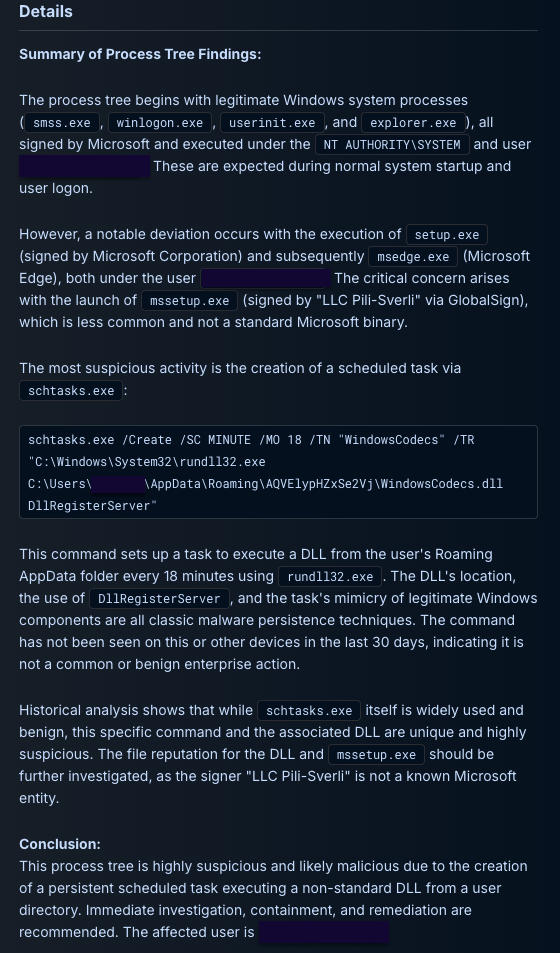
rundll32.exe ...\AppData\Roaming\AQVElypHZxSe2Vj\WindowsCodecs.dll DllRegisterServer
Three characteristics raised the suspicion level:
- Execution path. The DLL was located in a randomized subdirectory within the user's roaming profile (AppData\Roaming\AQVElypHZxSe2Vj). Legitimate software installs to predictable paths under Program Files or ProgramData. Randomized directory names within roaming profiles are a common tactic for concealing payloads, because they blend into a directory structure that varies naturally across users.
- System binary abuse. The use of rundll32.exe to proxy the execution of a non-standard DLL is a textbook living off the land technique. Rundll32 is a trusted Windows binary, known as a LOLBin (living off the land binary), that security tools often allow by default. By routing execution through rundll32, an attacker runs arbitrary code under the cover of a legitimate system process.
MITRE ATT&CK tracks this as T1218.011 (Rundll32).
- COM registration. The invocation of DllRegisterServer suggested an attempt to register a malicious component within the operating system's COM (Component Object Model) architecture. This provides an additional persistence mechanism beyond the scheduled task itself, embedding the payload deeper into the system's execution framework.
What Does Zero Environmental Prevalence Indicate?
To rule out the possibility that this was a unique but legitimate administrative tool, the AI performed an automated prevalence search across the entire environment. The results confirmed:
- The specific command line had zero prevalence across all other endpoints.
- Neither the DLL nor the randomized path had appeared anywhere else in the environment in the preceding 30 days.
Environmental prevalence is a powerful investigative signal. Legitimate enterprise tools, even uncommon ones, tend to appear on multiple machines or have historical precedent. When a command line, file path, and DLL name are all unique to a single endpoint, the likelihood of a benign explanation drops sharply.
At this point, three independent signals converged: an irregular execution cadence, a LOLBin execution chain through rundll32, and zero environmental precedent. Each signal alone could have an innocent explanation. Together, they pointed toward a deliberate attempt to establish persistent access on the endpoint.
How Was the Initial Access Vector Identified?
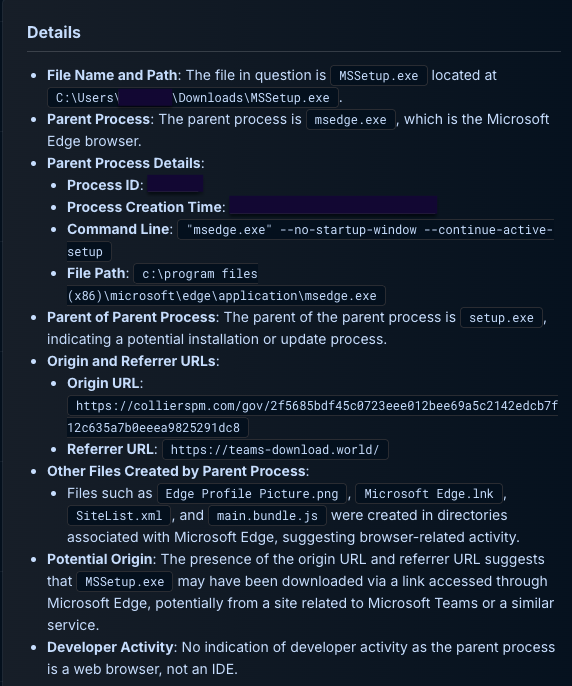
With the persistence mechanism confirmed, the AI SOC Analyst pivoted to reconstruct how the malicious file arrived on the system. By correlating file-system events with browser telemetry, the AI traced the full delivery chain:
- The referral chain. The AI identified a specific referrer URL, https://teams-download.world/, which directed the user to the malicious payload. The domain was designed to impersonate a legitimate Microsoft Teams download page.
- The payload origin. Microsoft Edge was used to download an installer named MSSetup.exe directly from https://collierspm.com/. The file name and delivery mechanism were crafted to appear as a routine software installation.
- The execution chain. Upon running the installer, which was signed by an unfamiliar publisher, it dropped WindowsCodecs.dll into the randomized roaming directory and used schtasks.exe to establish the 18-minute recurring task. The use of schtasks.exe, another legitimate Windows binary, to create the scheduled task is itself a system binary abuse technique tracked by MITRE as T1053 (Scheduled Task/Job).
The attack chain was now fully reconstructed: social engineering through a spoofed download page led to a deceptive installer, which deployed a concealed DLL and established persistent execution through scheduled task abuse.
How Did the AI Validate the Blast Radius?
Simultaneously with the access vector investigation, the AI verified the scope of the compromise. It confirmed that:
- The compromise remained confined to the single affected endpoint.
- No lateral movement had occurred, including no remote interactive sessions (Remote Desktop Protocol, Secure Shell) or connections to other internal hosts.
- No privilege escalation was detected prior to the alert.
Scope validation is a critical step because an investigation that confirms malice but fails to assess spread leaves the response team working with an incomplete picture. By confirming containment early, the AI SOC Analyst gave the response team confidence that remediation could focus on a single endpoint.
Why These Malware Persistence Techniques Confirmed a Compromise
The AI SOC Analyst's verdict was built on a reconstructed chain of evidence spanning multiple telemetry sources:
- Deceptive delivery infrastructure. A spoofed download domain impersonating Microsoft Teams, routing through a compromised legitimate site.
- Concealed payload deployment. A signed installer dropping a DLL into a randomized roaming profile directory.
- Stealthy persistence mechanisms. Scheduled task execution via rundll32 on an irregular 18-minute cadence, with COM registration for additional persistence depth.
By correlating process trees, browser telemetry, file-system events, and environmental prevalence data, the AI SOC Analyst produced a complete narrative of the attack. The investigation moved from an ambiguous scheduled task alert to a confirmed compromise with full attack chain visibility.
What Malware Persistence Techniques Should SOC Teams Watch For?
This investigation highlights several malware persistence techniques and detection signals that SOC teams encounter regularly. Each maps to well-documented attacker tradecraft:
- Scheduled task persistence (T1053). Provides reliable re-execution without requiring administrative privileges. Look for tasks with short, irregular intervals and execution targets outside of standard installation paths.
- Rundll32 abuse (T1218.011). Frequently used to execute malicious DLL exports under the cover of a trusted process name. Monitor for rundll32 loading DLLs from user-writable directories, particularly AppData\Roaming.
- Randomized AppData directories. These are rare in legitimate enterprise software. When a DLL or executable lives in a directory with a randomized name under a user profile, treat it as a high-confidence indicator of payload concealment.
- Execution cadence as a behavioral signal. Short, irregular scheduled task intervals (sub-30 minutes, non-standard numbers) often indicate persistence reliability rather than a business function. This is a behavioral signal that complements signature-based detection.
Environmental prevalence as a verdict accelerator. When a command line, file, or path has zero precedent across an environment, benign explanations become far less likely. Prevalence checks are one of the fastest ways to move from suspicion to confidence during an investigation.
Investigation #225578 was conducted by Dropzone AI's AI SOC Analyst. To see how AI agents investigate alerts autonomously, explore the self-guided demo.














.png)