

Executive Summary
An Atypical Travel alert triggered after Microsoft Entra ID observed the user's last known successful sign-in in Louisiana, followed shortly by two new logins from separate Verizon mobile IPv6 addresses geolocated to Denver. The short time gap between these locations triggered Entra ID's impossible-travel detection, marking the sequence as potentially suspicious.
Dropzone AI investigated autonomously, enriching user information, IP addresses, and device context across Entra ID, Defender, and Sentinel. Both Denver IPv6 addresses mapped to Verizon's carrier-grade mobile network, where regional IP shifts are common and often misinterpreted as long-distance travel. Dropzone AI also checked Microsoft Graph calendar data, which showed the user was scheduled for in-person meetings in Denver that day, and all sign-ins came from the user's known mobile device with MFA enforced.
Taken together, the evidence supported legitimate user travel rather than credential misuse, and Dropzone AI closed the alert within minutes.
This is part of a series that we’re calling the AI SOC Diaries showcasing interesting real-world investigations that the Dropzone AI SOC analyst has performed. Dropzone AI is deployed to 200+ organizations, largely thanks to our MSSP customers that use our AI SOC analyst to provide MDR services to their clients.
Previous AI SOC Diaries entries include:
- Investigation #57977 - Legacy Auth, Real Business: The MFA Alert That Didn’t Signal Compromise
- Investigation #46671 - Unmasking the Relay: Navigating Alerts Triggered by Anonymized IP Services
- Investigation #38175 - How Dropzone AI Cracked a Tricky VPN Logon Alert
- Investigation #51541 - Silent Threat or Software Update? Decoding a Suspicious Dell Installer Alert
What Triggered This Atypical Travel Alert Investigation?
The first thing that the Dropzone AI SOC analyst does upon receiving an alert is to orient itself on what type of alert it is, what it is meant to detect, and then come up with hypotheses for why the alert might be malicious or benign. It will then plan an investigation to test those hypotheses. This flow is based on the OSCAR investigative methodology.
In this case, Dropzone saw that Microsoft Entra ID triggered an Atypical Travel alert for user b**@*.com, a manager at a financial organization.
The alert compared a Monroe, Louisiana sign-in with a subsequent Denver, Colorado session that occurred less than ten minutes later.
At first glance, that velocity suggested impossible travel, but Dropzone AI immediately pivoted through enrichment, historical baselines, and user context before any human analyst touched the queue.

The key question: Was this truly a risky sign-in, or a false positive caused by mobile carrier networks?
How Did Dropzone AI Investigate This Atypical Travel Alert?
Dropzone AI conducted a comprehensive autonomous investigation across multiple data sources and correlation points.
Investigation Process:
- Enriched IPv6 addresses to identify Verizon carrier infrastructure
- Analyzed user identity through Microsoft Graph
- Queried 30 days of historical IP usage in Sentinel and Defender
- Validated device posture and MFA compliance from Entra sign-in logs
- Correlated tenant-wide environment baselines
- Cross-referenced Microsoft Graph calendar data showing scheduled Denver meetings
The investigation resolved the alert as a false positive within minutes without human analyst intervention.
What IPv6 Addresses Triggered the Impossible Travel Detection?
Dropzone AI began by enriching the two IPv6 addresses tied to the new sign-ins:
IPv6 Addresses Analyzed:
- 2600:100e:b04a:…15a → Verizon Business (Denver, Colorado)
- 2600:100e:b083:…11c1 → Verizon Business (Denver, Colorado)
Both addresses resolved to Verizon Business infrastructure in the Denver area, consistent with Verizon's mobile carrier network.
The preceding successful sign-in was geolocated by Microsoft's telemetry to Monroe, Louisiana. When the user authenticated again from Denver roughly ten minutes later, Entra ID classified the sequence as Atypical Travel.
Because mobile IPv6 ranges, especially from carriers like Verizon, often rotate across regional gateways, geolocation changes of this kind can appear more dramatic than they are. Dropzone AI treated the distance signal as uncertain pending additional context.
AI Analyst Reasoning: Dropzone AI identified the Denver IPv6 addresses as Verizon Business ranges typical of carrier-grade mobile networks, a nuance that often weakens geolocation-based risk scoring. It therefore interpreted the Louisiana-to-Denver movement as a low-confidence geo-infeasibility signal until supported by further evidence.

What User Identity Context Did Dropzone AI Analyze?
Dropzone AI turned to the user's Microsoft Graph profile, establishing the user's identity posture and baseline configuration before weighing the sign-ins.
User Profile Analysis:
- Standard, non-privileged user (b**@*.com)
- Assigned the firm's Managing Director role
- MFA fully registered with strong authentication methods in place
- No PIM activations in the week leading up to the alert
- Group membership aligned with organizational baseline
- SSPR enrollment properly configured
- No elevated risk indicators in user configuration
All profile attributes aligned with the organization's normal executive baseline, suggesting no elevated identity risk.
Why Did Historical IP Analysis Change the Risk Assessment?
Dropzone AI ran parallel queries across Sentinel and Defender for the previous 30 days to establish historical IP usage patterns.
Historical IP Findings:
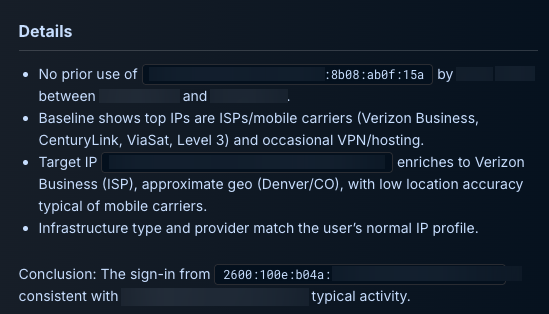
- The …15a IP address was first-seen with no prior logins
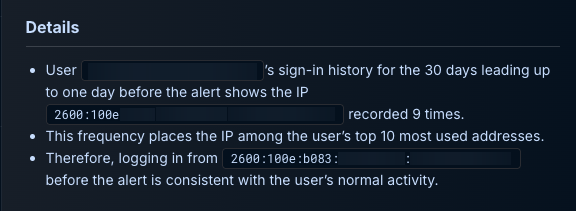
- The …11c1 IP address appeared nine times, ranking among the user's top 10 IPs
- The user's typical IP mix comprised:
- Mobile carriers (Verizon, CenturyLink)
- Travel-related business networks (hotel and conference Wi-Fi)
Hinge: The repeat use of …11c1 reframed the "new location" hypothesis. In true positive impossible-travel cases, one IP typically reflects real user behavior while the other belongs to the attacker. Here, the historical pattern showed the Denver IP had been used legitimately before, making the Louisiana-to-Denver shift more consistent with normal mobile IP rotation than with credential compromise.
How Did Device Identity and MFA Validation Confirm Legitimacy?
Dropzone AI then pulled device and session details from Entra's AADSignInEventsBeta logs to validate device consistency and authentication methods.
Device and Session Analysis:
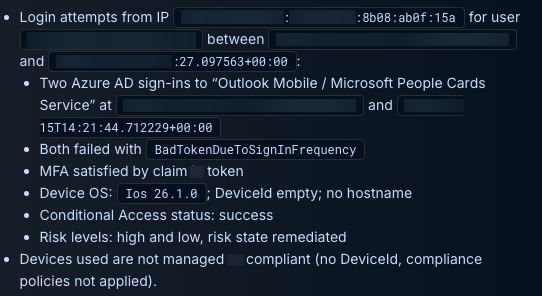
- Both sign-ins originated from the user's personal iOS device running version 26.1.0
- Standard MSAL user agent for Outlook Mobile
- MFA satisfied through token-based authentication
- Device identity aligned with historical patterns
- Device was unmanaged and non-compliant (typical for BYOD mobile usage)
- Sign-ins targeted expected workloads:
- Outlook Mobile
- Microsoft People Cards Service
Each attempt failed with BadTokenDueToSignInFrequency, a routine signal that the session token had expired and needed reauthentication rather than anything suggestive of credential misuse.
AI Analyst Reasoning: Dropzone AI correlated successful MFA, consistent device identity, and expected application usage, finding no signs of password failure, replay behavior, or token misuse. The sessions matched normal user activity, not an intrusion attempt.
Why Was Tenant-Wide Environment Analysis Critical?
To understand whether the IPv6 addresses represented shared infrastructure or something tied specifically to the user, Dropzone AI pivoted to tenant-wide sign-in logs.
Environment Correlation Findings:
- Only a single account (b**@*.com) had ever appeared with either of the Denver IPv6 addresses
- No other users in the tenant accessed these IP addresses
What This Ruled Out:
- Common shared environments such as hotel Wi-Fi
- Corporate proxies or VPN endpoints
- Cloud-hosted egress points
- Attacker-operated infrastructure appearing across multiple users
Instead, the pattern pointed to a personal mobile connection associated only with this user's device, supporting the legitimate travel hypothesis.
How Did Calendar Data Verify Physical Travel?
Dropzone’s AI SOC analyst doesn’t just use security tools to investigate alerts. It can use business systems as well, such as Microsoft 365 and Google Workspace. This allows it to scan emails to verify legitimate business relationships or check people’s calendars, as was the case here.
To verify physical location context for the user, Dropzone AI then pivoted into Microsoft Graph calendar events for the 24 hours surrounding the alert.
Calendar Verification:
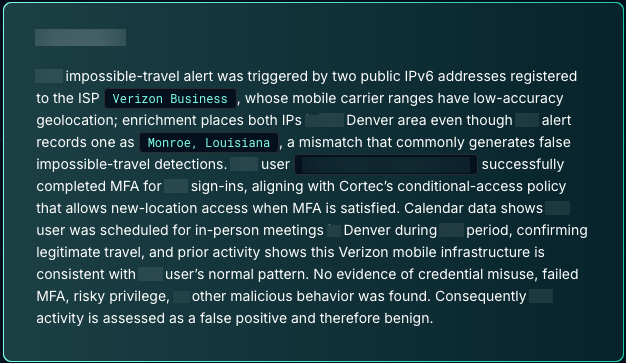
- User had multiple in-person meetings scheduled in Denver
- Meetings included sessions at the Four Seasons Hotel Denver
- Events tied to a private-equity summit
- Schedule aligned cleanly with the sign-in locations and timing
This provided external confirmation that the user was physically in Denver during the alert window.
Hinge: Calendar data independently verified the user's presence in Denver, closing the loop between physical travel context and the sign-in telemetry.
What Was the Final Alert Disposition?
Classification: Benign, normal travel behavior
Priority: Closed / Informational
Supporting Evidence:
- All sign-ins passed MFA and conditional-access checks
- Both IPv6 addresses were mobile carrier endpoints frequently mis-geolocated
- Calendar, device, and historical patterns confirmed legitimate activity by the same user traveling in the U.S.
The "impossible travel" alert was a false positive, resolved automatically without human escalation.
What Does This Investigation Demonstrate About Autonomous Analysis?
This case illustrates how Dropzone AI's automated analysis moves beyond enrichment to contextual reasoning.
Key Capabilities Demonstrated:
- Interpreted carrier network behavior rather than accepting geolocation at face value
- Weighted uncertain signals based on multiple corroborating data points
- Verified physical travel through independent calendar evidence
- Applied measured judgment across cross-domain context
It didn't just collect data. It interpreted it, recognizing carrier network behavior, weighting uncertain signals, and verifying physical travel through corroborating evidence.
By combining cross-domain context with measured judgment, Dropzone AI resolved the alert autonomously and with high confidence, reducing the manual triage effort that this type of case typically demands.
The Result: When automation applies reasoning instead of reaction, security teams gain both speed and trust in their decisions.
See Dropzone AI in Action
Experience autonomous investigation that resolves impossible travel alerts in minutes, not hours. Dropzone AI analyzes IPv6 geolocation, validates device identity, correlates historical patterns, and verifies calendar context across Microsoft Entra ID, Sentinel, Defender, and Graph - eliminating false positives without manual triage.
Ready to reduce alert investigation time by 90%? Schedule a demo to see how autonomous investigations achieves 100% alert coverage while freeing your analysts for strategic threat hunting.
If you’re not ready to talk to us yet, we also have a self-guided demo that allows you to explore a live Dropzone AI environment.
What Technical Concepts Underpin This Investigation?
Six key technical concepts underpin this investigation and explain how Dropzone AI distinguished legitimate travel from potential credential compromise.
Carrier-Grade IPv6 Rotation
Mobile carriers such as Verizon frequently assign IPv6 addresses from large, regional pools that shift as devices move between towers or routing gateways. These rotations can make IP geolocation appear to jump hundreds of miles, even when the user is in the same city.
Geolocation as an Estimation Signal
IP geolocation in Entra ID reflects the provider's registered routing location, not the user's physical position. Mobile and cloud networks often misrepresent true location, making distance-based detections noisy without supporting context.
Conditional Access Evaluation
A ConditionalAccessStatus = Success result confirms that all applicable policies, including MFA, were validated and satisfied. It signals enforcement, not policy bypass, and is a strong indicator of legitimate authentication.
Historical IP Baselining
Repeated use of the same IP or provider range is a meaningful trust signal. When an address that initially appears "new" actually shows up in a user's historical logs, especially mobile carrier ranges, it often reframes travel anomalies as expected behavior.
Unmanaged BYOD Devices
Unmanaged iOS and mobile devices are common in many environments. Device management status is a helpful data point, but in isolation it is not an indicator of compromise. Device identity, MFA, and activity alignment carry more weight.
Calendar-Driven Context Validation
Correlating sign-ins with Microsoft Graph calendar events provides independent physical context. When scheduled in-person meetings align with sign-in locations, they strengthen the confidence of benign travel determinations.













.png)